Taming the light - Internal reflection and contrast issues in macro photography
Long ago I read an article by master John Hallmen whose original Swedish title was “Att tämja blixten.” It meant “taming the light” and contained many tips on using flash. What I want to talk about this time isn’t about flash, but I’ll use the same title when naming the piece: Taming the light.
The topics I’ll mention below might at first glance look like “squeezing blood from a stone.” But that’s not the real story. These are “the little details that make all the difference,” “little-known tricks of the trade.”
Internal reflection problem
In macro shooting we bring together many pieces of equipment. The light coming from our subject passes through these parts and reaches the sensor. But let’s ask a small question: Does all the light that reaches the sensor come from our subject? Unfortunately, no! We’ll see where and how problems arise, but first, to warm up to the topic, let’s look at the negative effect that appears.

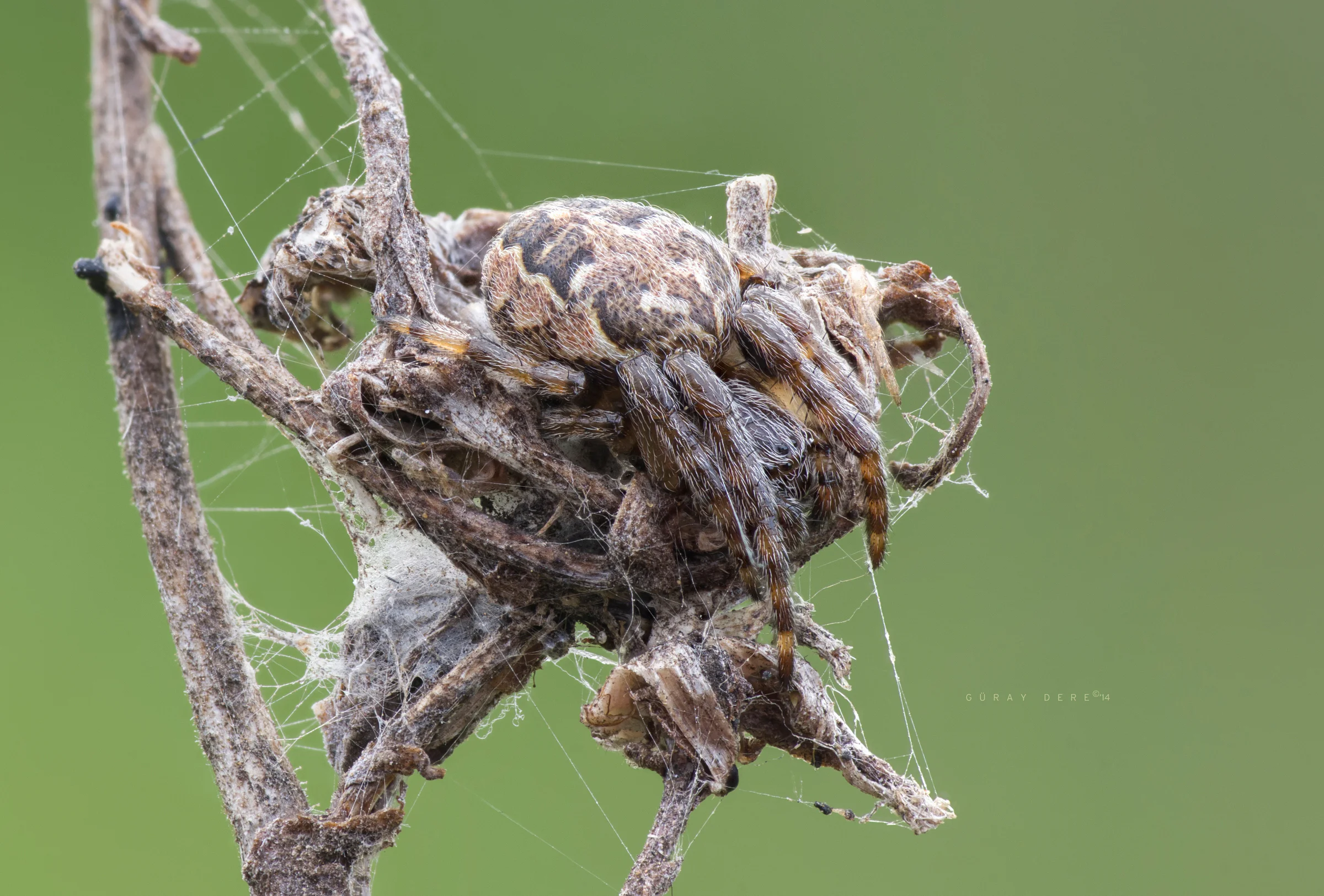
The photo above was taken last year with a lens and tube system our friend İrfan sent me for testing. After a brief examination it turned out the lens was in good shape and the source of the problem was internal reflection in the tube. Here’s what the same lens delivers with a setup that prevents internal reflections:

Let’s not confuse the shine on the insect with internal reflection. Since these are test shots taken with flash, the bright parts of the insects reflect a bit. But that’s not internal reflection. Internal reflection causes veiling flare across the entire photo, color issues, and low contrast. In the second photo you can see blacks are truly black and details are sharper. The internal reflection problem we’re focusing on has been corrected.
Let’s examine sources of internal reflection and remedies in a bit more detail.
Frontal stray light
When we take a photo, we only see the portion of the scene that enters the frame. But in the direction the lens is looking, there’s light outside the frame, hitting the front element from the left and right. Even though these don’t appear in the photo, they still enter the lens. They don’t reach the sensor directly, but they fall on internal surfaces of the lens or on the inner surfaces of parts like tubes and bellows. From there they bounce and reach the sensor, causing problems such as veiling flare, loss of detail, bad color, and areas that should be deep black showing up as gray.
Let’s take an example from yourself. You want to read a book by the window on a bright day. How do you sit? Facing the window? Or with the light at your back, facing inward? Would you be comfortable if the light from the window hits your face? We want the light to illuminate only the book; it shouldn’t shine directly into our eyes.
We’ll deal with the reflective inner surfaces later, but first we should tackle the unnecessary light entering in the first place.
Solution: Lens hood
Do you use lens hoods on your lenses? They’re especially common on telephotos. The goal here is to admit only light coming from the subject. To block stray light. Think of it like blinkers on a horse! You need to set that blinker’s field of view to match what the lens sees in the frame.
When shooting landscapes with wide-angle lenses, our frame is very large. You don’t usually mount a deep lens hood on these. You’ll more often see petal shapes, because a hood that extends forward will immediately intrude into the frame. A huge umbrella-like hood flaring sideways would look a bit comical, too. With telephotos, since the angle of view narrows, we can use narrow and long hoods. As the shade extends forward, it blocks light entering from the sides. We get a higher-contrast image.
Macro is more interesting. Like telephoto, we’re looking from quite a narrow angle. We have the chance to use long hoods. But we’re very close to the subject! We can’t extend the hood too far. If we do, we risk spooking the live subject, blocking front lighting, and casting shadows.
Thankfully, working distance changes with magnification. And as magnification increases, we can change our hood design.
At high magnifications, the physical frame we’re looking at on the subject is so small that it’s tiny relative to the surface of the lens’s front element. This brings a big advantage. We can design forward-tapering, cone-shaped hoods that effectively cut stray light but won’t interfere with illuminating the subject.
I use enlarger lenses a lot. Since these are used reversed, their mount sides face outward. And because almost all of them use the standard M39 mount, we have a big stroke of luck here: M39 extension tubes!

In the photo above, on the left, two pieces (UK-made) of M39 extension tube are standing alone. In the center, two pieces (Russian-made) of M39 extension tube are attached as a hood to a Nikon El-Nikkor 50mm f/2.8N enlarger lens. On the right, a single M39 extension tube is mounted as a hood to a completely different lens, a Meyer Diaplan projection lens.
You can find these prehistoric tubes for next to nothing. They’re usually sold as a set of four pieces. I prefer the Russian ones—they’re sturdy and the interior design is quite successful. By attaching one or two pieces to the outside of a reversed lens as above, we get a very practical hood.

Even though modern lens coatings play a big role in cutting stray light, it’s still possible to see the benefits of a hood. Most of the lenses I use aren’t exactly modern. The microscope lenses are practically my age. Many of us use similar Lomo-type microscope lenses. So let’s not say “oh, come on”—we should use hoods on microscope lenses as well, if possible. Since our working distance is a few centimeters, we keep the hood short so we can still light the subject.
Incorrect diffuser / lighting position
Whether hand-held or in a studio, there’s a mistake we often make. In an effort to use our lights effectively, we move them way too close to the subject. A flash held very close, or something like a paper cup used as a diffuser on the front of the lens, can send light into the lens even if it doesn’t enter the frame. In your setup the insect is lit beautifully, but the strong light from these illuminating surfaces slips right into the lens from the edge. Sometimes it washes the whole photo white; sometimes it creates a crescent-shaped flare on the opposite side of the frame from the light source.
Solution: Lens hood and proper lighting
The hood topic is as I wrote above. If we use one, we protect the lens from light and can be more flexible with our lighting. Still, in cases where we’re using very short hoods—like with a microscope lens—or can’t use one at all, we need to watch the diffuser’s length. Even if it doesn’t enter the frame, it shouldn’t protrude in front of the lens.
For example, if we’re shooting a fly portrait from 2 cm away, there’s no point in lighting the fly’s backside. A 3 cm diffuser length will be enough. It’s sufficient for the side facing us to be well lit. A 10 cm diffuser will pointlessly light the fly’s back and, in doing so, send light into the lens.
Tube/bellows/helicoid inner surfaces
As the saying goes, you get what you pay for; when the budget is tight we’re forced to turn to cheap solutions. Chinese-made adapters and DIY tubes often form the basis of internal reflection problems. In fact, whatever the price, it’s best not to trust these parts too much and to take precautions.

Diagnosing reflection issues is quite easy. Hold the tube up to the light, look through it, and check whether there’s glare/reflection on its walls. The photo above shows the tube that produced the problematic photo I described and showed at the beginning. This is what I saw when I examined the tube.
The inside of this tube—with a lens mounted at the end—is so shiny that the garden view and trees, with all their detail—just like with a projector—fell onto the inner surface of the tube and from there reflected straight to the sensor (to our eye). This stray light pollution affects the entire photo. There’s light leaking all around the inner surface.
Solution: Light trap
Structures like tubes/bellows/helicoids usually have ribbed inner surfaces to reduce internal reflections. With quality materials that’s sufficient, but in many Chinese products, even when there are ribs, they’re not matte enough to suppress shine. In that case we place light traps inside the tube and at its entrance/exit. You’ll read the details of this process in a moment.
There’s another point to watch with bellows. Old and worn bellows may have cracks and tears. To prevent light leaks through these, the bellows should be inspected thoroughly and any holes repaired.
Poorly fitting adapters
Adapters that connect parts to each other sometimes don’t seat perfectly due to poor quality control. (And sometimes they seat so tightly you can’t get them off!) This reveals itself as a slight wobble and can allow light to leak in through the gap.
Solution: A solid adapter
I haven’t personally faced this yet, so I haven’t had to fix it. I think stop-gap measures like black tape will cause problems again in the long run—and they’re an eyesore. These parts also bear load. We want to entrust our valuable gear to a solid adapter. My advice is to replace adapters that don’t hold well without wasting time.
Reflection from the sensor
This will sound odd, but our camera’s sensor is also a light source—just like how the Moon looks bright in the night sky. The image focused there illuminates the sensor, and that brightness lights up the inner-facing glass of the lens, the inside of the tube, etc.—the whole system—from within. In other words, it reflects. Moreover, this reflection can bounce back and forth multiple times among internal elements.
To some degree this is true of all sensors. But in some models it’s more pronounced. In extreme cases—say, long exposures at night—complaints about sensor reflections are more noticeable. In the two photos below you can see the effects of sensor reflections (the photos aren’t mine).

We see how the lights on the bridge form layered reflections. This is what I meant by multiple reflections: sensor-lens-sensor-lens-sensor… The light bounces between sensor and lens each time, losing power, creating internal reflections. It produces ghost images. They look as if seen through multiple panes of glass.
This reflection occurs for every pixel that forms the photo. Of course, bright points are the main culprits. Manufacturers aren’t sitting on their hands; they take measures to reduce this problem. Sony A7 and Sony A7 II are good examples. Under normal circumstances I know both are very good cameras—I use a Sony A7 II myself.

Here are photos of the same scene shot with these two bodies. In the Mark II version, the streetlight’s sensor reflection is significantly improved. I’ve just given you one more topic to research when buying a new camera :)
Solution: Light trap
I’ll keep up the mystery of the light trap a little longer! The cure-all light trap :)
There’s a very interesting spot that gets illuminated by sensor reflection and causes trouble. In macro I almost always use reversed enlarger lenses. Guess what happens when you reverse a lens. Around the front element you usually have the brand and model info—and they write it in bright white letters. Now, when we reverse the lens and point those white surfaces toward the sensor, what happens? There you go: internal reflection! These white markings reflect light from the sensor very strongly. So they need to be covered with a light trap.
Body defects
This problem is very rare, but there are interesting cases. It’s something to research when upgrading bodies. With brand-new models there’s always a chance of some issues. I’m writing this just for your information.
For example, there were complaints that in the Nikon D300, the light used by the AF system leaked into the body and caused internal reflections. Another example: on the Fujifilm X-T1, light was leaking in through the HDMI port on the body and degrading the photo.
Solution: Not much!
If we’re lucky, we can rely on the warranty. Thankfully these are rare issues. For now, we can forget about them.
LIGHT TRAP We’ve finally arrived at the light trap. I even wrote the heading in all caps. Don’t let the name fool you—it’s not rocket science. A light trap means a surface that’s as matte as possible and non-reflective. Of course it needs to be black. A surface that absorbs all light like a black hole!

Manufacturers use different designs and materials to reduce internal reflections. The Pentax SMC-K 135mm f/2.5 in the photo is famous for its sharpness. On the mount side of this lens we see a rectangular frame. Thus an opening just large enough for the sensor to see has been created. They avoided a design that would leave the glass fully exposed and increase sensor reflections. This frame is a light trap.

The Olympus 65–116 variable-length tube is a legendary product among macro lovers. Look at the inner surface lining of this tube whose quality you can feel in every detail. That velvety, fabric-like structure that doesn’t reflect at all is a light trap.
Last year I found a paper sold under the name “light trap.” A seller in the UK offered A4 sheets for £6. Curious, I bought one right away and used it in tube connections. Later I realized there’s a completely identical material sold in stationers as “black velvet paper.” I unnecessarily dealt with overseas prices and postage. Now you might want to stop by the nearest stationery shop.
As an alternative to black velvet paper, you can also try ultra-matte black spray paints—for example those used in modeling—or, if you can find them, paints with high absorptivity similar to Vantablack, which may be more durable on some surfaces.
Light trap for reversed lenses
Here you see a light trap made for a Rodagon WA 40mm enlarger lens. In the middle is the bare lens; on the right is the light trap placed inside the reverse-mount adapter; on the left, at the very front, is the lens and adapter used together.

Microscope adapter light trap


Light trap inside the hood
A moment ago I mentioned using M39 tubes as hoods. Instead of using them bare, we can place a light trap between two sections to reduce internal reflections. Of course the hole diameter matters here. We shouldn’t cover too much of the glass. Depending on the aperture, if you stop down more you can cover a bit more of the glass. In the photo below, a light trap has been placed between the two parts of the middle tube. Thus, any edge reflection forming in one piece will be caught by the trap before passing to the other piece.

You can apply the same logic to the tubes, bellows, and similar devices you normally use. If you can’t do a full inner lining, placing interstitial light traps like this can greatly reduce the chance that inner-surface reflections will make it across to the sensor. But let me remind you: if you leave the opening too small, you can cause vignetting. With a few trials it’s not hard to dial in the right size.
We’re a bit luckier with APS-C cameras in terms of vignetting, since the sensor is smaller; you can leave the trap openings in tubes and bellows a bit smaller.
Lining the inner surfaces of lens adapters
This part is more relevant to friends using mirrorless bodies. After moving to a Sony A7 II body, I started buying all kinds of adapters so I could use the equipment I already had. Since I found it odd to pay over $100 for a tiny hollow metal ring, I turned to Chinese adapters around $15–$20. I still avoided the absolute cheapest ones, of course—not that far :)
When the adapters started arriving, I encountered frightening levels of internal reflection, even in the best-made ones. So my suspicions were spot on. Thankfully I had prepped all the materials: velvet paper, pen, ruler, scissors. With the exception of one, the job was done in one sitting. But one of them turned out to be a bit stubborn, so I chose that one for the walkthrough.

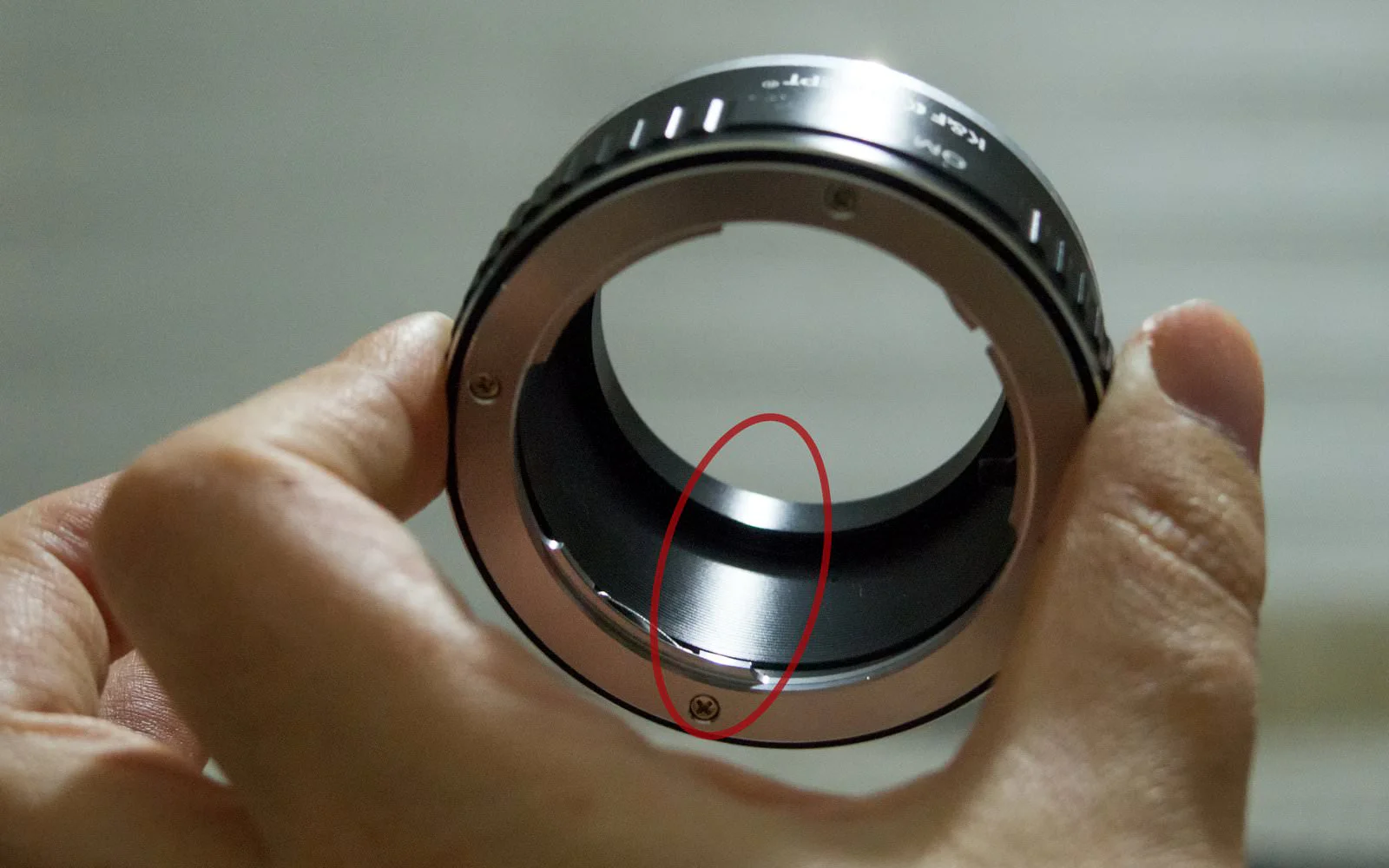
Despite the excellent workmanship of these branded adapters, they crawl on the floor in the internal reflection test. When we hold one as above and look at the inner surface, it’s immediately clear it has the potential to ruin our photo. We need to address this surface right away.


We insert the velvet pieces and voilà—our adapter. Compare this photo, taken with exactly the same light and angle, to the first one. We’ve created an inner surface to make the manufacturer jealous. Our light trap is complete.
Important note
As you can see, the material we used for the light traps has a velvety, fibrous surface. After cutting and trimming, some of those fibers are loose. After cutting, you should give the piece a good shake and blow it off. Even so, some fibers may remain, or more fibers may shed from the weave later on.
There’s nothing between the adapter and the sensor. Over time, if one of these drifts onto your sensor, it will show up in the photo as a thread-like dust mark. If that happens, they’re very easy to remove with a blower. So far (for many years) I haven’t had a problem.
If you’ve been using a DSLR for a long time, you’re already used to sensor dust. Dust gets in constantly when you change lenses. You also likely know how to clean it. If you do occasional sensor cleanings with a blower, you won’t even notice the extra dust that might come from light traps. The reason I’m writing this note is to remind you to keep a blower and use it regularly.