Focus stacking technique

I may have repeated this in other posts, but I’ll touch on it again as an intro. As you know, one of the big pains for macro photographers is the very shallow depth of field. While we can narrow the aperture to increase DOF a bit, it’s quite limited. Stopping down past a certain point seriously harms image quality. It leads to the light behavior we call diffraction, creating a rough watercolor effect. We lose fine detail.
In this post I’ll introduce the method that solves this major problem for macro photographers.
Focus stacking
These days, macro photography doesn’t happen without focus stacking.
Focus stacking is an image-processing technique—a gift of the digital world. In the film era, we had to make do with whatever a single frame delivered. After moving to digital, first the theory and then the software had to mature. Now we have it all. With this technique, by processing our photos we can work around the shallow DOF. But in this post I’m not going to dwell on how the processing is done. Still, you’ll find a short example video at the end. Here we’ll focus more on what it is and on examples. The practical tips can stay for other posts.
Studio focus stacking

Focus stacking is most often used in studio shoots. By “studio,” don’t think of a commercial photo studio :) I’m using it to mean a controlled environment. A small corner at home dedicated to this is enough. We lock down the camera and lighting setups. The subject—our insect—also stays fixed in front of the lens. Background, etc., everything is prearranged. That becomes our mini studio. Since everything stays put and our subject is usually dead, we can comfortably go to high magnifications.
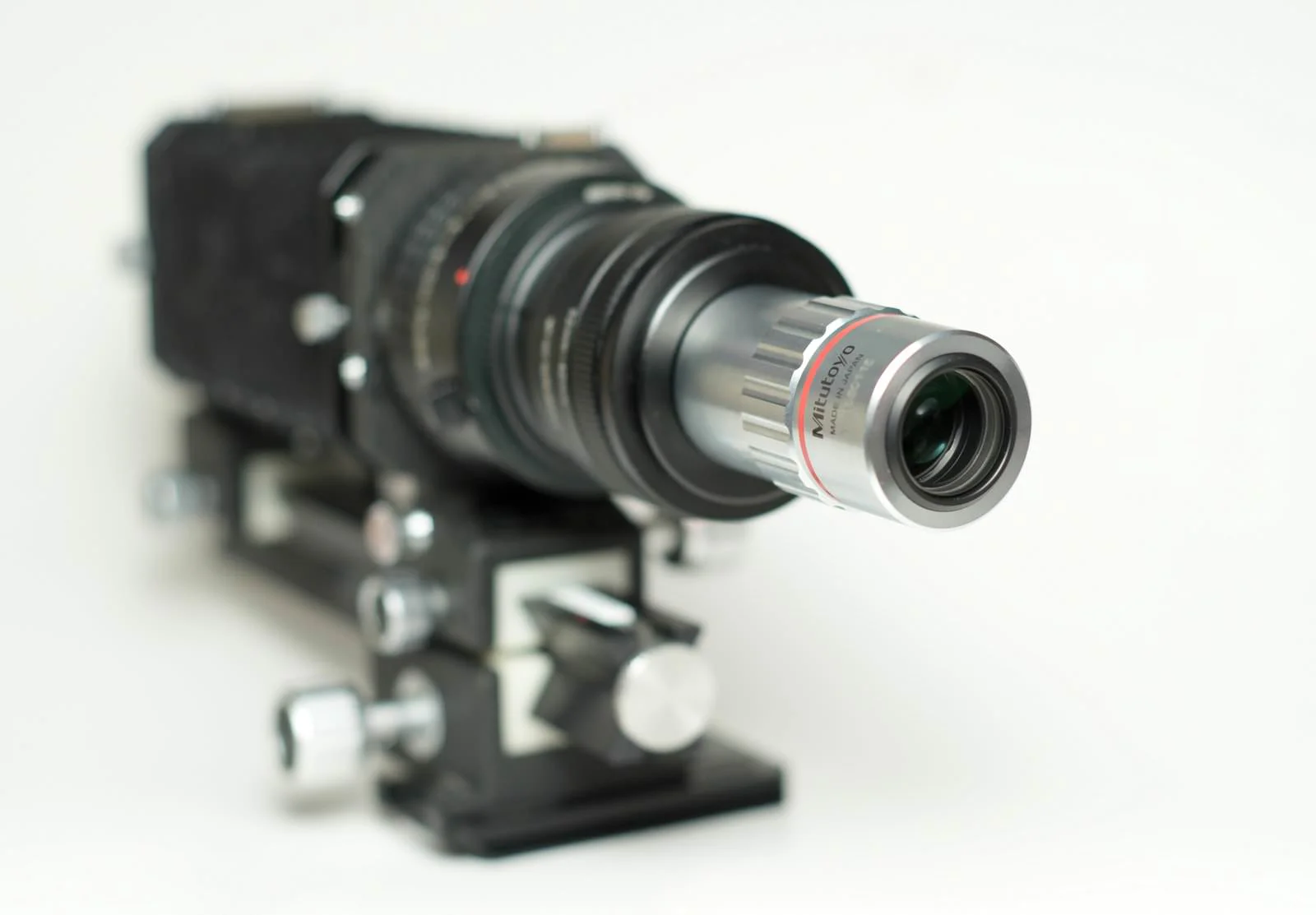
Back to the problem: especially at high magnifications the DOF gets so thin that, looking at a single frame, we can’t even tell what we’re seeing. The photo below was shot with the minimalist studio setup next to it.


I used the Lomo 8X microscope objective here to emphasize how serious the situation is. If you say “I can tell what it is,” fair enough—use it like this if you want :)
To render the entire object sharp, we embark on a laborious process. Each time, we nudge the focus forward a tiny bit from the area we see sharp and take another shot. We keep repeating this, shifting the focus to a new slice each time. Depending on lens type, magnification, and subject size, this can run into hundreds of photos. By the end, the sequence should contain sharp portions covering every part of the insect. We must complete the run without skipping any region.

Then we move on to the second laborious task. Our goal is to merge them into a single “all-sharp” image. For this we use software like Photoshop, Zerene Stacker, Helicon Focus, or Affinity Photo. After feeding the frames to the program in order, we start the focus stacking process. By “in order,” I mean a focus plane that moves front-to-back or back-to-front. It’s not strictly required, but it yields better results. The software processes to a certain point automatically. It detects the in-focus regions: since pixel-level color transitions and contrast edges are more pronounced in sharp areas, the programs figure out which parts are sharp in which frames, and take only those sharp regions from each frame.
After that, we take the mouse and fix problem spots ourselves. If necessary, we inspect all frames one by one and paint in detail where it’s missing. After a while, we get our reward:

To get this jumping spider photo, 126 frames were captured. I always prefer RAW for the shoots. This way most lighting issues can be addressed later on the PC. Details in areas that look overly bright or overly dark can be recovered.
The RAW–JPEG conversion, rough processing, and touch-up steps for the 126 shots took a few hours in total. Long enough to be called tedious if you don’t enjoy the process. Whether the result is worth it is debatable. But I enjoy it, and there’s no other way to obtain this photo. With modern gear and fast computers, everything can be done much faster.
Handheld focus stacking We don’t always need a fixed setup for focus stacking. In my outdoor shoots I sometimes prefer handheld. This lets me photograph many insect species in a short time. So what do I do then?
For handheld, magnifications of 1X–4X are used. While I’m not battling microscope-level DOF issues at those magnifications, the problem persists at every macro scale. In practice, I try to shoot 15–20 frames as quickly as possible before the insect moves. As I do this, I aim to create a focus plane that progresses steadily forward or backward. Looking at the results later, I often see I didn’t focus precisely where I intended. I encounter severely shifted framing, many frames focused on the same spot, or regions with no sharp frame at all (missing slices). To reduce these odds, I need to be generous with the frame count. Half of the shots taken for one photo go to the bin. Example:
If you examine this series closely, you’ll see the framing differs more or less in each one. In some the spider’s legs are out of frame; in others the focus repeats in the same region. In such cases Photoshop produces much better results than the other three programs. After checking the merged image at the end, we find we’ve achieved sufficient sharpness. In this example, the posterior abdomen of the spider in the shot was intentionally left blurred. If we’d cared about that area too, we would have needed to shoot ~10 more frames.

You might say, “What kind of framing is this? The spider isn’t centered, half of it’s chopped off.” True—that’s how it turned out. I could have posted a perfect example, but in handheld you’ll rarely catch perfection. Think of it as good enough not to be trash—i.e., a success for handheld.
In-field focus stacking What I called handheld is already done in the field. So what’s this heading about? The real beauty in the field is using natural light. For that, we need to carry a setup similar to our home studio. Despite wind, light, and the challenges of live insects, the best macro work is produced this way. Since I’ve covered these in separate posts, I’ll just share links rather than repeat them:
Open field – natural light – hands-on macro
Natural light and focus stacking in cool weather
Auxiliary gear for natural light: tripods and holders
Focus stacking challenges First of all, both the shooting and processing stages demand serious effort. The biggest challenge is finding the time. But that’s about ourselves—since we’re people who enjoy this, I should take that back. Let’s not call it a challenge. It’s what makes us macro photographers. Now, the real challenges:
A gap in the stack
We did the shoot. Hundreds of photos. We sit down at the computer and start processing. We realize that as we shifted the focus plane, we skipped a section. There’s a strip that isn’t sharp. This annoying situation happens if we don’t execute the focus shift well or don’t size the step correctly. For me it’s often impatience—I painfully realize I took steps that were too big because I wanted to see the result immediately.
Crude rails or bellows rails are sometimes not precise enough. No matter how hard we try, we miss areas. I’ll review the Newport Linear Stage devices—one of the ideal tools for shifting—in the next post.
Shooting live insects and movement
 Burst sequence of a live treehopper
We won’t always use dead insects in studio and high-magnification work. We can apply this method to living subjects too. It just requires more patience and a greater chance of starting over—we must accept that. If our insect makes a significant move or changes position, we usually have to discard the entire shoot. The same goes for framing: if the camera or the leaf/branch the insect is on moves before we finish, it’s cancel time.
Still, there’s some room for recovery. The animation above was made by showing in succession 35 focus-stack frames I captured handheld of a live aphid at 12X. The focus advances slightly from front to back in each frame. You can see how active the aphid was during the shoot. Even so, merging these frames yielded a clean, single sharp image.

Variable lighting conditions
Because focus stacking takes minutes and is time-consuming, we can’t get identical light in every frame. Especially with natural light, the light constantly changes with conditions. Passing clouds, the sun’s angle, swaying trees—everything affects the amount and color of light. The software is powerful, but not omnipotent. Wherever variable conditions struck in the series, the final result shows color halos in regions pulled from those frames, creating unwanted effects—and extra work.
As a precaution, we try to finish quickly. Especially with risks like changeable weather, active insects, or wind, even at the expense of some quality we need to speed up.
- If the support gear is quality, that helps most: a good tripod, head and rail, solid holders, remote release, an EFSC-capable body… all wonderful things :)
- By stopping down a bit more, we can increase step size and reduce the total number of frames, cutting the time.
- By raising ISO a little and shortening exposure, we can save time.
- MOST IMPORTANTLY, if possible, get a body that can perform the entire focus stacking sequence automatically. We can finish in seconds what would take minutes. Example: Olympus OM-D series.
- We can get automated macro rails. That way the entire capture process can be automated without tying ourselves to a specific lens or body.
Batteries dying
Before starting, it’s wise to check the batteries in the camera and flash if any. Running out mid-process can be maddening. Even if we have spares, swapping them will shift the camera, we’ll lose the framing, and have to start over.
Memory card filling up
Likewise, inserting a new card or deleting old images mid-session will disturb the framing and send us back to square one. Even if you manage it gently enough not to ruin the composition, it wastes time and patience. Check that you have enough free space before you start.
Finally, here’s a short video showing that even a problematic shoot can sometimes be processed successfully in Photoshop. I shot this a long time ago and didn’t process it because it was flawed. Normally I delete photos like this as soon as I get home. Somehow this one survived. I decided to give it a chance—and Photoshop’s algorithm surprised me. Despite the insect shifting backward in every frame, the focus stacking produced a successful result. I quickly fixed the tiny “double antenna” artifact caused by movement by removing it, and that was that.